Loading Option Set Hierarchies
An Option Set Hierarchy (OSH) is a parent → child cascade between single-select properties. Selecting a parent value narrows the values available in its child dropdown. For example, selecting Merch Size Group = APPAREL can restrict the Merch Division Code dropdown to M-APP, W-APP, K-APP.
The Option Set Hierarchy loading can be done using CSV file.
This CSV should include valid Option Set data that already exists in the system.
It's important to note that the loading can be done for a single Option Set Hierarchy at a time.
When to use a Hierarchy vs. a Rule Set
| Need | Use |
|---|---|
| Standing parent → child cascade between two single-select properties | Option Set Hierarchy |
| Three or more levels deep (Segment → Category → SubCategory) | Option Set Hierarchy |
| Narrow a dropdown only when a non-dropdown property has a certain value | Rule Set (optionSetValues) |
| Also lock editability or set required-ness conditionally | Rule Set |
| The parent is NOT a single-select (e.g. it's a number, text, or multi-select) | Rule Set |
Hierarchies only work across single-select properties. Anything else needs a Rule Set.
How a Hierarchy is stored
A Hierarchy is two related records:
OptionSetHierarchy— the cascade tree itself. Holds the ordered list of TypePropertyIds (parent first) and a nestedoptionstree of allowed values at each level.TypeOptionSetHierarchyLink— attaches the tree to a specific Type (item,plan-placeholder, etc.) with the same ordered list of TypePropertyIds.
TypePropertyIds, not slugs
The hierarchy engine keys off TypePropertyIds (the internal IDs from the Type definition), not slugs. A slug-based config silently fails to load — there is no error, the cascade just never fires. Always resolve slugs to IDs from the live Type definition before saving the hierarchy.
How the cascade is evaluated
When the user opens a child dropdown, the engine:
- Finds the child's position in
hierarchyTypePropertyIds(depthN). - Walks the
optionstree from depth 0 down toN − 1, filtering by the entity's currently selected value at each parent level. - If a parent has no value selected on the entity, all branches at that level are flattened — the child shows every descendant.
- Returns the set of allowed values at depth
N.
A few things to know about how this behaves:
- If no parent value is picked, the child dropdown shows every value — the cascade can't filter from nothing.
- If the parent holds a value that isn't in the hierarchy, the child dropdown will appear empty. The user has to fix the parent before they can pick a child.
- The order of the parent → child chain is fixed by the
hierarchylist. Changing the order in that list changes which property filters which.
Examples
Two-level cascade
{
  "name": "Merch Size Group → Merch Division Code",
  "hierarchy": [
    "<typePropertyId-merchSizeGroup>",
    "<typePropertyId-merchDivisionCode>"
  ],
  "maxDepth": 2,
  "options": [
    {
      "value": "APPAREL",
      "options": [
        { "value": "M-APP" },
        { "value": "W-APP" },
        { "value": "K-APP" }
      ]
    },
    {
      "value": "FOOTWEAR",
      "options": [{ "value": "M-FTW" }, { "value": "W-FTW" }]
    }
  ]
}
{
  "typeId": "<typeId-Item>",
  "optionSetHierarchyId": "<hierarchyId>",
  "hierarchyTypePropertyIds": [
    "<typePropertyId-merchSizeGroup>",
    "<typePropertyId-merchDivisionCode>"
  ]
}
Three-level cascade (Segment → Category → SubCategory)
{
  "name": "Segment → Category → SubCategory",
  "hierarchy": ["<tpId-segment>", "<tpId-category>", "<tpId-subCategory>"],
  "maxDepth": 3,
  "options": [
    {
      "value": "softAccessories",
      "options": [
        {
          "value": "giftBoxSet",
          "options": [
            { "value": "smallGiftBoxSet" },
            { "value": "largeGiftBoxSet" }
          ]
        },
        {
          "value": "giftCard",
          "options": [
            { "value": "physicalGiftCard" },
            { "value": "eGiftCard" }
          ]
        }
      ]
    },
    {
      "value": "apparel",
      "options": [
        { "value": "tops" },
        { "value": "bottoms" }
      ]
    }
  ]
}
The hierarchyTypePropertyIds array on the link mirrors hierarchy in the same order.
Loading With The CLI and Local file
The contrail CLI encompasses all the necessary functions for effectively generating Option Set Hierarchy JSON from a CSV file. It offers two distinct commands that can be employed to initiate the JSON generation process.
Generate Keys CSV from Values CSV
If your OSH CSV file contains the values (e.g. "Knitt Sweaters") rather than keys (e.g. "knitt_sweaters"), you can convert it using the utility command parseOptionSetsHierarchyValuesToKeysLocalFile. The command will generate a version of the OSH based on the option set keys.
The CLI command to run is
contrail types parseOptionSetsHierarchyValuesToKeysLocalFile <File Path>
Generate JSON from Keys CSV
To generate JSON using a local file, you must possess a CSV file that includes valid Option Set Hierarchy data with the associated keys.
The CLI command to run is
contrail types parseOptionSetsHierarchyLocalFile <File Path>
Map Option Set Hierachies in System
After successfully generating the Option Set Hierarchy JSON from a local CSV file, it's now time to utilize it within the VibeIQ system.
Create Option Set Hierachy using JSON
As depicted in the image below, the process involves creating an Option Set Hierarchy from the Admin console.
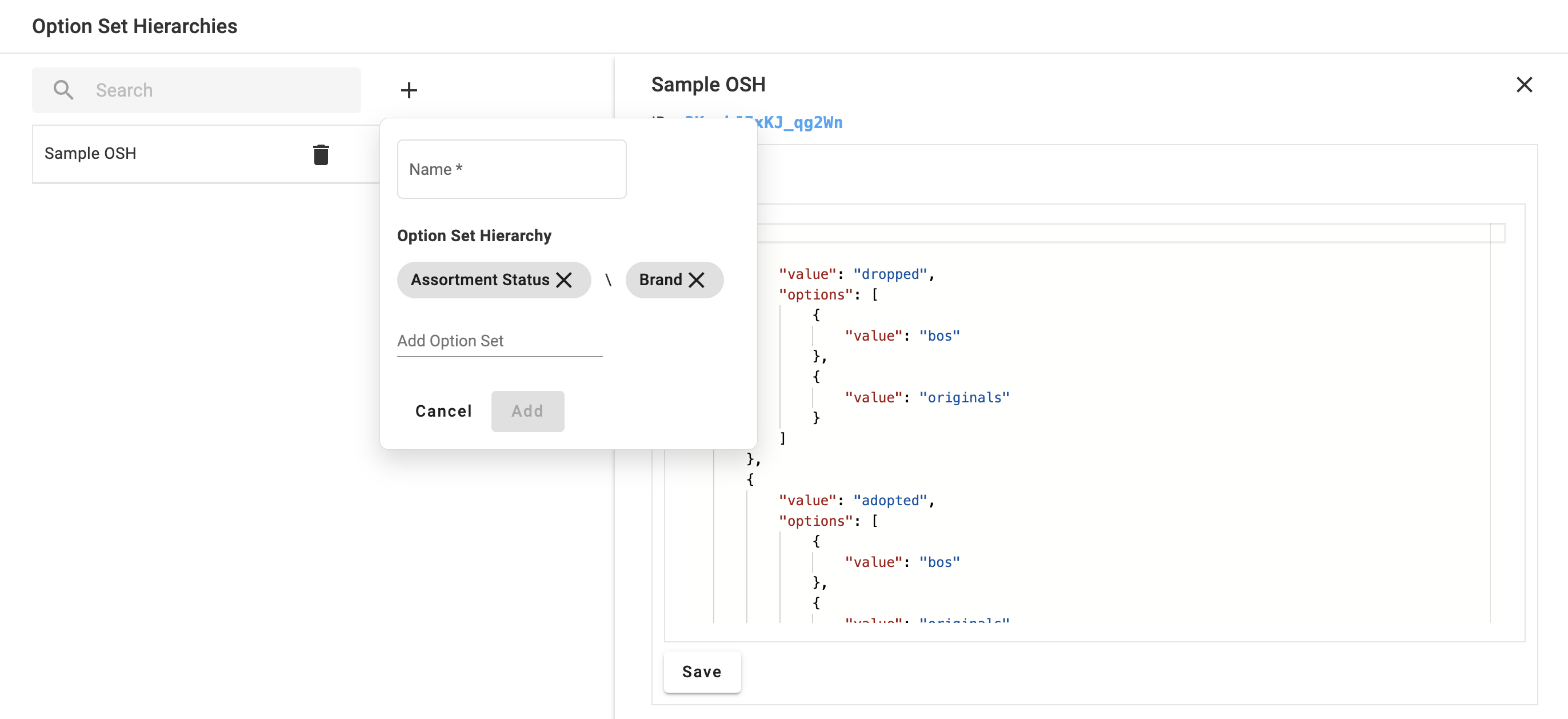
You can assign any name to it and add Option Set Hierarchy options sequentially, following the headers provided in the CSV file. Once created, you can simply incorporate the generated JSON into it, and you'll have your Option Set Hierarchy ready to go.
Assign Option Set Hierarchy
Merely creating an Option Set Hierarchy is not sufficient. You need to additionally assign it to the Item and Plan Placeholder Types.
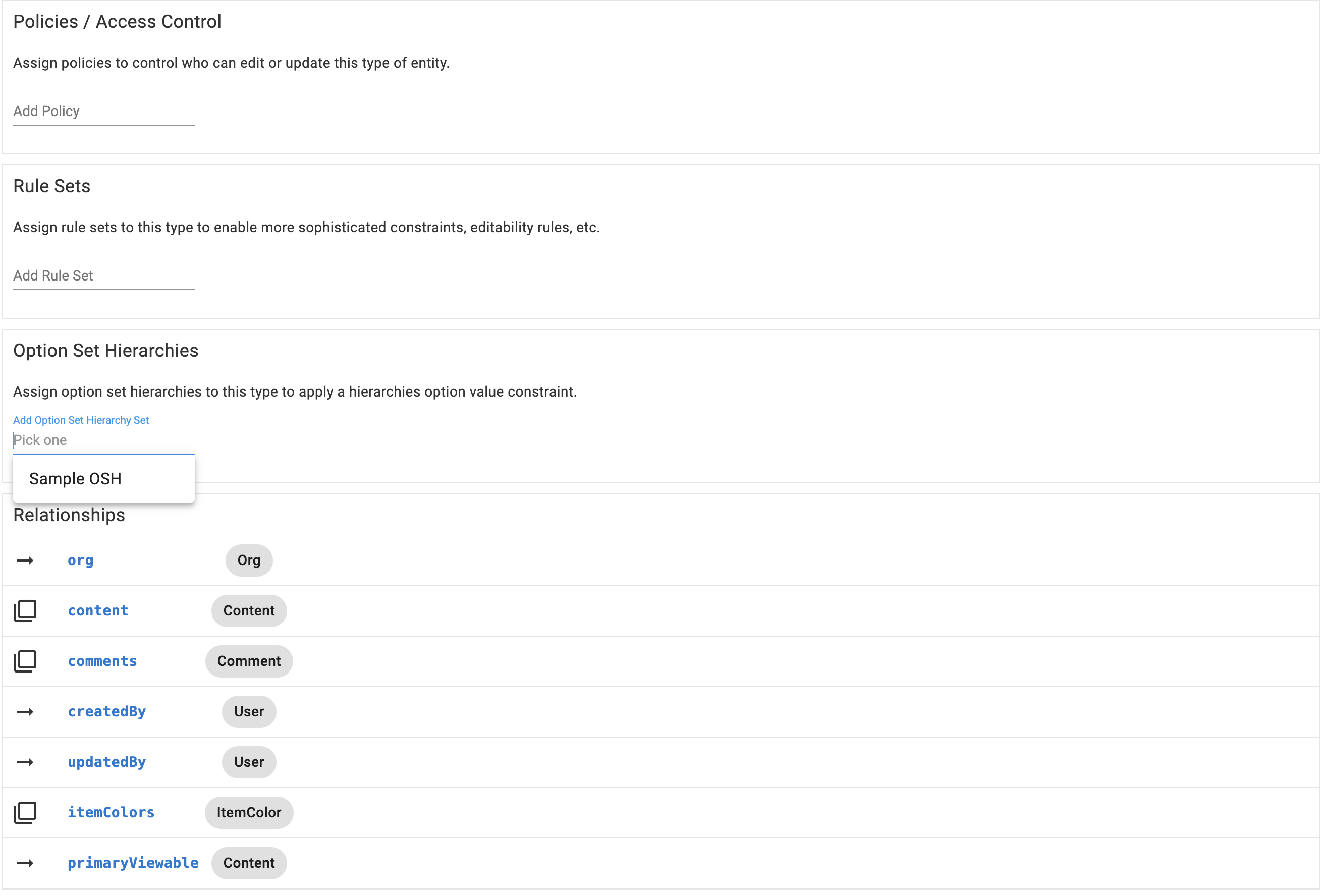
As illustrated in the image above, simply include the newly created Option Set Hierarchies within the Item and Plan placeholder entities.
Gotchas
- Single-select only. Both parent and child must be single-select. Multi-select / number / text / date parents need a Rule Set instead.
- Values must exactly match the option-set values (case-sensitive). A value in the hierarchy tree that's not in the property's Option Set is unreachable, and the picker will look empty for the affected branch.
- Pre-existing data stays valid until edited. Items saved before the hierarchy existed may hold a parent/child combo the new hierarchy forbids — they keep their stored values until a user edits the row, at which point the save forces them to pick a valid combo. Communicate this to the customer before deploying.
- Hierarchies are Org-scoped. Don't share a hierarchy across orgs — clone it per org and remap the TypePropertyIds.
- No fan-in. The cascade is a tree, not a DAG. You cannot have two parent values converging into one child value record — the child value has to appear under each parent it belongs to.
- Adding a new property in the middle of an existing hierarchy is a breaking change: every existing child row loses its parent path. Usually easier to create a new hierarchy and migrate.
- Mid-cascade missing parent flattens. If the entity has no value selected for an intermediate parent in a three-level cascade, every branch at that level contributes its descendants to the child picker.